Features
Everything the door needs
A host stand your team can run a Saturday on, and a booking page your guests will actually enjoy. Here's what's in the box.
Host stand
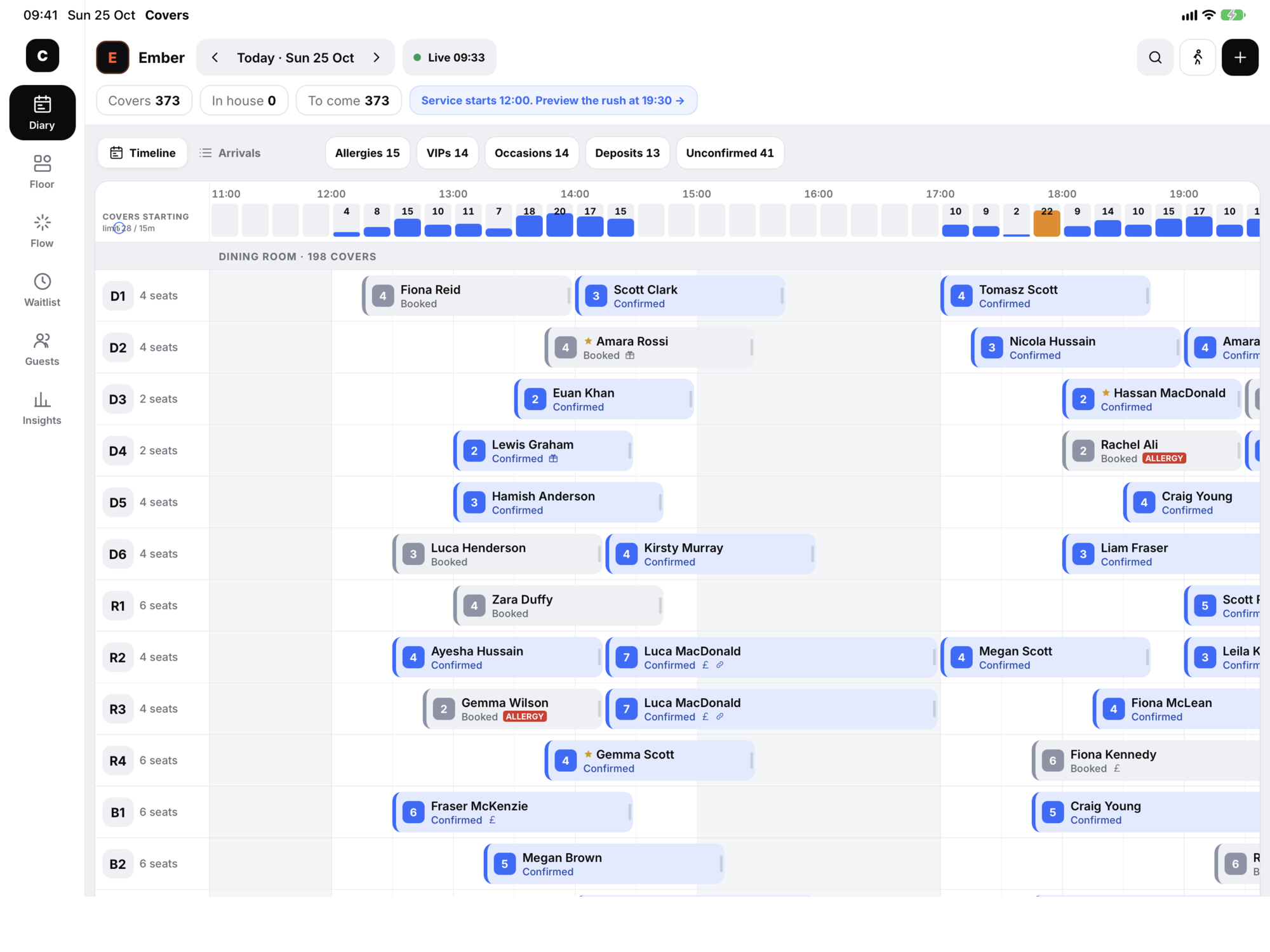
The whole night on one screen
Diary, Arrivals, Floor, Flow, Waitlist, Guests and Insights. On iPad it sits on a left rail; on iPhone it's a tab away.
-
Diary
Tables down the side, the service across the top. Drag a booking to another table or time; drag its edge to give a table longer. Drop it on a clash and it refuses and puts it back.
-
Arrivals
To arrive, in house, all: the night as a list, in the order guests will walk in.
-
Floor plan
Your rooms as they are, with every table's timer, course and next booking at once.
-
Waitlist
Add a walk-in, get a quoted wait from the live floor, and seat them when a table frees.
-
Guest book
Every guest's visits, lifetime spend, last visit, allergies and tags. Type two letters and they're found.
-
Insights
Tonight in plain English: covers, the busiest half hour, where bookings came from, allergies and occasions.
-
Allergies up front
An allergy is a red banner on the booking and a red ALLERGY mark on its diary block, not a note someone has to open.
-
Undo on every change
Move, re-time, re-size, mark late or no-show: each one shows an Undo, and Z undoes it on a keyboard.
-
Find anything
⌘K, or the search button: a name, a number, a table, a time like 19:30 or a booking reference.
-
Any date
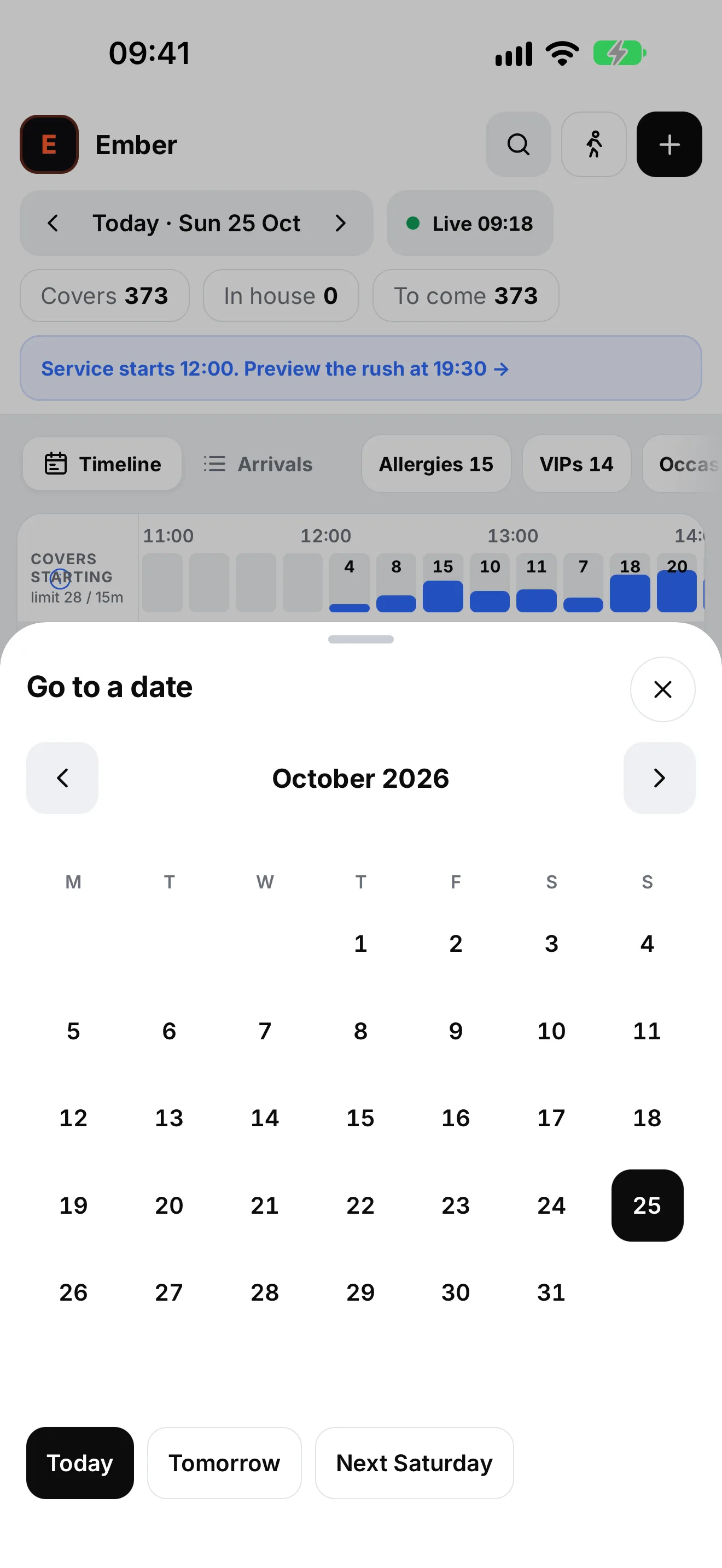
Today, tomorrow, next Saturday, or any day on the calendar, without losing your place.
-
Seat, bill, close
Seat a table and its tab opens on the GFX till. Close the bill and the spend lands on the guest's profile.
-
Live
Online bookings land on the stand within seconds with a “New website booking” toast and a table already chosen.
Just as good on a phone
The same host stand in your pocket: the diary, arrivals and every booking sheet, with live counts of covers, in house and still to come. Handy for the manager on the floor, or checking tomorrow from the bus.
Flow + Copilot
The push-button host stand
Every table is one key. One press does the next thing: seat, bill, clear. Copilot reads the room and puts its suggestions beside the keys as one-tap colour blocks.
- Chase a late party, or release the table
- Rescue a table that's running over
- Brief the kitchen before an allergy arrives
- Move a party to a tighter fit and free seats
- Seat the waitlist the moment a table fits
- Confirm the tables that haven't confirmed
- Warn you about a kitchen peak
- Spot a quiet slot with room to sell
Guest booking
A booking page that feels like you
On your website, on your socials, in the app. Every step is in your brand, and every booking goes straight onto the host stand.
-
In your brand
Your colours, typeface and voice. Text contrast is checked automatically so it always reads.
-
Party, date, time
One clear step at a time, with the next three weeks to pick from and times that show when they're nearly gone.
-
Extras
Pre-sell a celebration plate, a bottle on ice or flowers on the table, added to the bill.
-
Allergies and requests
Allergies and dietary needs go to the kitchen; occasions and special requests go to the team.
-
Deposits
Deposit rules per venue, for example for larger groups. The guest sees the amount before they confirm.
-
Instant confirmation
A booking reference, add to calendar, directions and the restaurant's number, straight away.
-
Manage or cancel
Guests find their booking with the reference and the last four digits of their mobile, and cancel themselves.
-
Waitlist when full
No dead end: guests can join the waitlist for a full night and get first refusal.
-
Remember me
Returning guests can save their details on their own device, in the secure keychain, to book faster.
Platform
One system, every device
-
The same platform as the till
Not an integration. Bookings, tables, tabs and spend are one system, so there are no table numbers to match.
-
iPhone, iPad, Android and web
One app for the host stand and guest booking on every device, plus the host stand in a browser.
-
Built for iPad
A left rail and two-pane layouts in landscape, long-press menus, and hardware keyboard shortcuts.
-
Private by design
No advertising, no tracking and no analytics SDKs in the app. The restaurant controls its guest data.
-
Accessible
Large touch targets, support for larger text sizes, and Reduce Motion respected throughout.
-
Ready for groups
Each venue with its own diary, floor, waitlist and branded widget; staff choose their venue at sign-in.
iPad keyboard shortcuts
Hold ⌘ on an iPad keyboard to see them all. A letter typed into a text field still goes to the field.
| Key | Does |
|---|---|
| N | New booking |
| W | Seat a walk-in |
| 1 – 6 | Switch tab: Diary, Floor, Flow, Waitlist, Guests, Insights |
| F | Flow |
| P | Preview the rush / back to live |
| Z | Undo the last change |
| ⌘ K | Find anything: a booking, a guest, a table, a time |

See it on a Saturday night
Book a demo and we'll walk you through Seato on a busy service: a guest books on their phone, it lands on the host stand, you seat them and the tab opens on the till.
Opens an email to support@glasgowgfx.co.uk. We'll reply to arrange a time.